Western Blot Time Management Master Every WB run, right on schedule
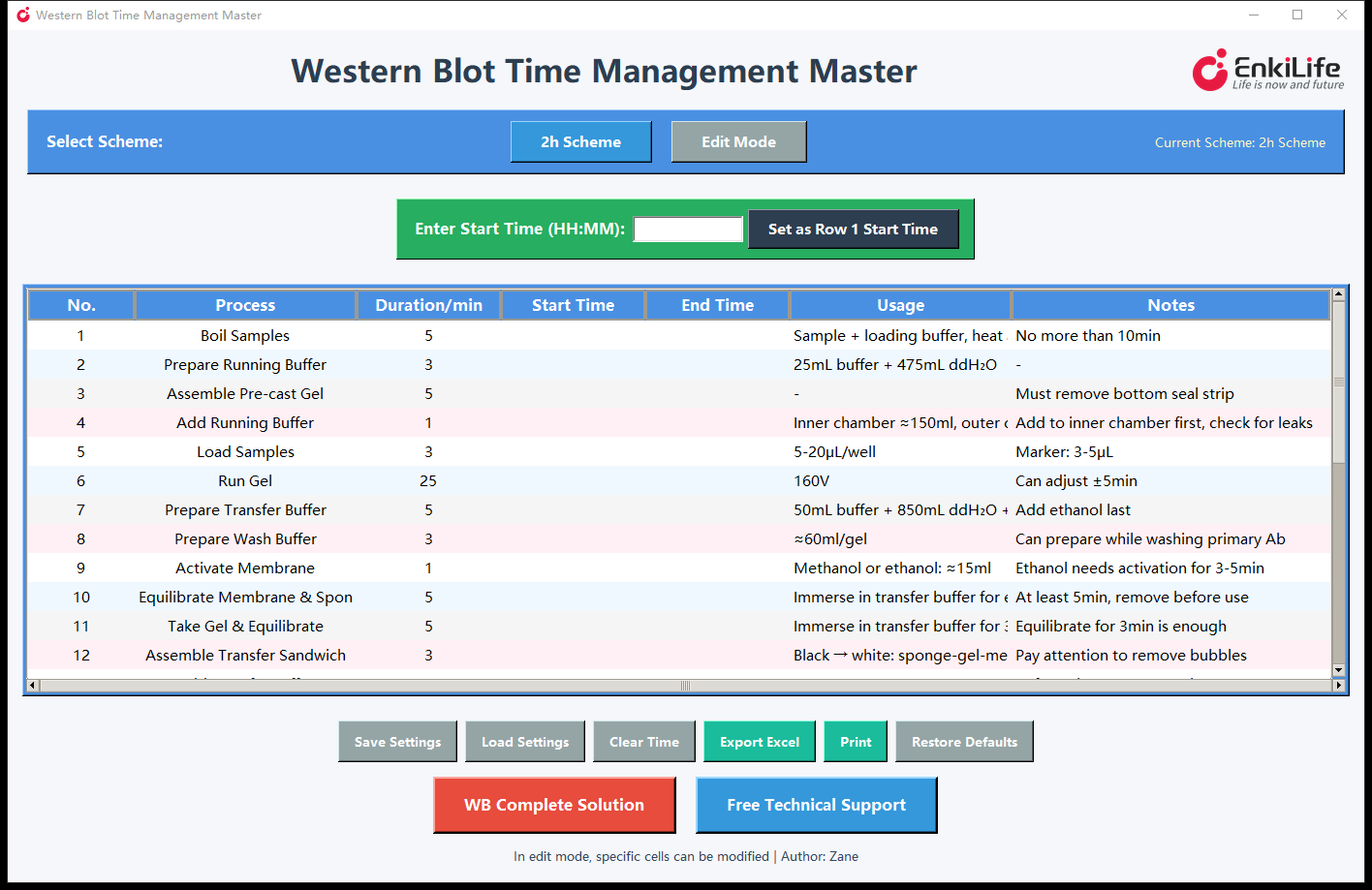
Enter your start time and the schedule for all 27 steps is instantly planned. The built-in 2-hour standard scheme can be fully customized in Edit Mode — no more mental arithmetic for "when will the gel finish?".
Why is WB timing so hard to plan?
If you run Western Blots, these will feel familiar.
Many steps, complex dependencies
Gel, electrophoresis, transfer, blocking, incubation, imaging — 20+ interlocking steps, all tracked by mental math and sticky notes.
Parallel steps make it worse
Preparing transfer buffer during electrophoresis, incubating antibody while washing — one slip and you stand idle for half an hour.
One delay, whole plan collapses
Samples loaded 10 minutes late and a dozen downstream times are all wrong again. Most people give up and "wing it".
Core features built for Western Blot
Every feature comes from real needs at the bench.
Built-in 2h Scheme
A complete 27-step WB workflow in 128 minutes, with duration, usage and notes pre-filled — ready to run out of the box.
Smart time calculation
Sequential and parallel steps handled automatically: change any start time or duration and everything downstream recalculates, even across midnight.
Edit Mode, your scheme
Double-click to edit duration, start time, usage and notes; Enter commits, Esc cancels — no accidental edits.
Save & load schemes
Save your customized scheme to a file and reload it anytime — perfect for standardizing workflows across the lab.
Export Excel & print
Export a formatted Excel file or print a paper copy — ideal for lab notebooks and SOPs.
Portable & adaptive
A single portable file — copy it to any lab PC and double-click. The window auto-scales from laptop to large display.
What does the 27-step scheme look like?
An excerpt of the 2h Scheme (27 steps in total, 128 minutes).
| No. | Process | Duration/min | Usage (excerpt) |
|---|---|---|---|
| 1 | Boil Samples | 5 | Sample + loading buffer, heat at 95℃ for 5 min |
| 2 | Prepare Running Buffer | 3 | 25mL buffer + 475mL ddH₂O |
| 3 | Assemble Pre-cast Gel | 5 | Must remove the bottom seal strip |
| 4 | Add Running Buffer | 1 | Inner chamber ≈150mL, outer ≈350mL (1/3) |
| 5 | Load Samples | 3 | 5–20μL/well (Marker: 3–5μL) |
| 6 | Run Gel | 25 | 160V, ±5min as needed |
| 7 | Prepare Transfer Buffer | 5 | 50mL buffer + 850mL ddH₂O + 100mL ethanol (add ethanol last) |
| 8 | Activate Membrane | 1 | Methanol or ethanol ≈15mL, activate 3–5 min |
| … blocking, primary/secondary antibody incubation, washing, ECL reaction, imaging — 27 steps in total … | |||
Up and running in three steps
No training required — you can use it right away.
Enter the start time
09:30 or 0930 both work — click "Set as Row 1 Start Time".
Get the full schedule
Start and end times of every step appear instantly, with a live Total Time row.
Adjust on the fly
If things run late, edit the current step and the rest re-plans itself; export or print to archive.
Who is it for?
New researchers & students
Follow the schedule step by step — your first WB runs as smoothly as a veteran's.
Multitasking at the bench
Know exactly when electrophoresis or incubation leaves you free to run other assays.
Labs & research groups
Share saved schemes across the group for a standardized, reproducible WB workflow.
Tech support & application specialists
Project the schedule during customer training and demos — professional and intuitive.
Frequently asked questions
Q1: Why can some cells not be edited?
Only in Edit Mode can Duration, Start Time, Usage and Notes be edited; No., Process and End Time are protected. Switching back to the 2h Scheme restores the standard scheme.
Q2: The calculated times differ from my actual operation
The software follows the standard workflow. Adjust the relevant durations in Edit Mode and everything recalculates automatically.
Q3: How do I create my own scheme?
Load the 2h Scheme, enter Edit Mode to modify durations and notes, then Save Settings. Reload it anytime with Load Settings.
Q4: Can I use it without Python installed?
Yes. It is a single portable file — just double-click to run. The exported Excel file needs Excel or a compatible office suite to open.
Make your next Western Blot right on time
V2.0 · Portable for Windows · CN/EN interface · Free
⬇ Download for Windows (≈12MB)Author: Zane